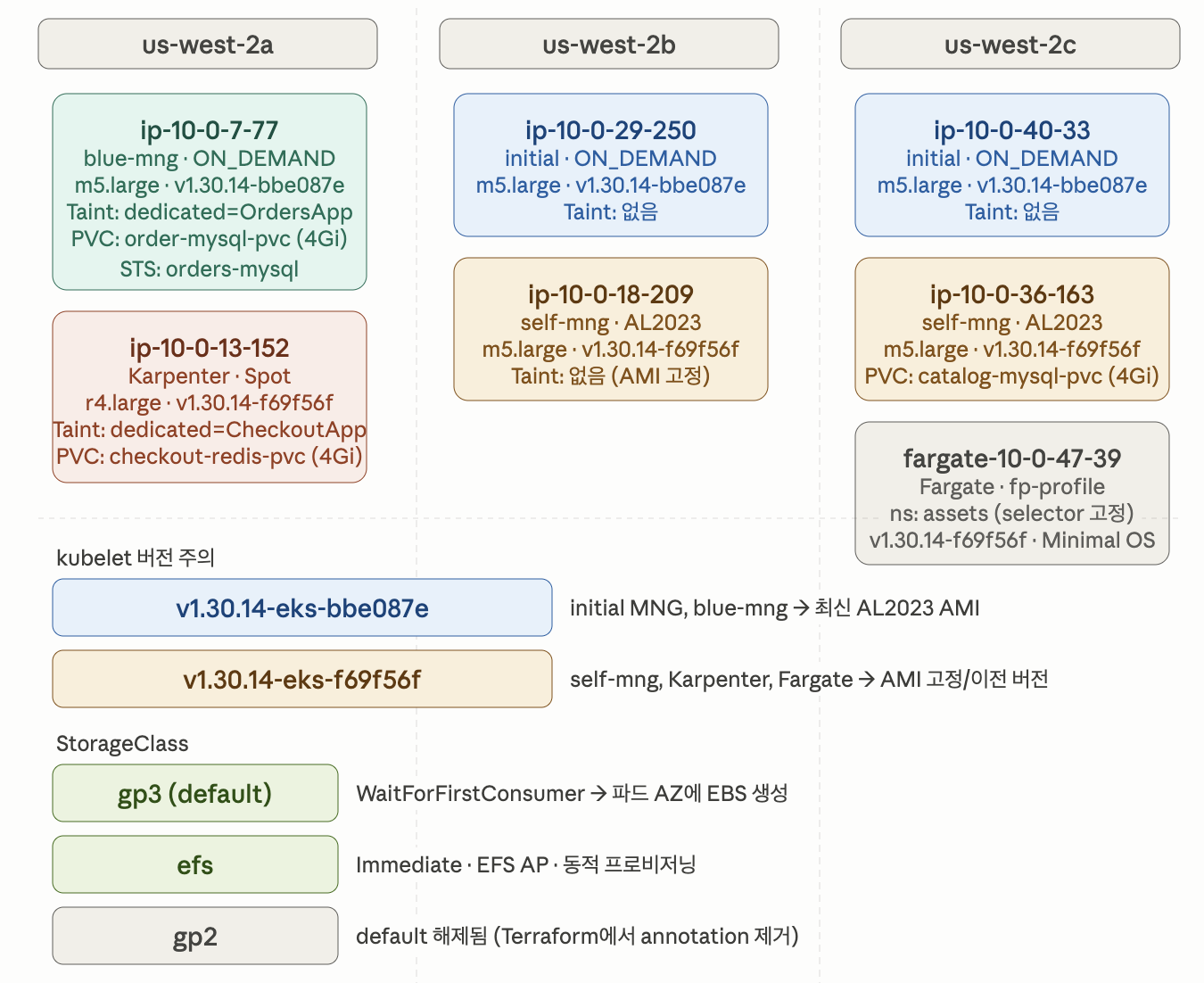
Taint는 해당 노드에 특정 Toleration 없는 파드는 절대 스케줄 안 된다는 선언입니다.
blue-mng의 dedicated=OrdersApp:NoSchedule은 base.tf에서 명시적으로 선언한 것이에요. Orders 서비스 Deployment에 이 Toleration이 있어야만 ip-10-0-7-77에 스케줄됩니다. 만약 blue-mng 업그레이드 중 이 노드가 drain되면, Orders 파드는 반드시 새로 뜨는 blue-mng 노드로 가야 합니다. Toleration이 blue-mng Taint에만 맞춰져 있기 때문에 initial이나 self-mng로는 못 갑니다.
ip-10-0-13-152 (Karpenter Spot)에 dedicated=CheckoutApp Taint가 붙어 있다는 게 흥미로운 포인트에요.
base.tf에서 self-mng에는 이 Taint가 없습니다. Karpenter NodePool spec.template.spec.taints에 선언되어 있어서 Karpenter가 노드를 프로비저닝할 때 자동으로 붙인 것입니다. 즉, Checkout 서비스는 self-mng 노드뿐 아니라 Karpenter Spot 노드에도 스케줄될 수 있는 구조입니다.
gp3의 WaitForFirstConsumer는 파드가 특정 노드에 스케줄될 때 그 노드의 AZ에 EBS 볼륨을 생성합니다.
즉, EBS 볼륨은 AZ에 묶여 있다.
order-mysql-pvc가 us-west-2a의 EBS 볼륨이라는 뜻이고, blue-mng 업그레이드 시 노드가 교체되더라도 새 노드가 반드시 us-west-2a에 떠야 이 볼륨을 재마운트할 수 있습니다. base.tf에서 subnet_ids = [module.vpc.private_subnets[0]]으로 blue-mng를 us-west-2a 단일 AZ에 고정한 이유가 바로 이것입니다. 이 설계가 없었다면 업그레이드 후 Orders MySQL 파드가 다른 AZ에 뜨면서 볼륨 마운트 실패로 파드가 Pending에 걸리겠네요.
catalog-mysql-pvc는 self-mng 노드(us-west-2c)에 마운트되어 있다.
self-mng 업그레이드 시 ip-10-0-36-163을 drain하면 catalog-mysql StatefulSet 파드가 이동해야 하는데, PVC가 us-west-2c에 묶여 있으므로 같은 AZ의 다른 노드로 가야 합니다.
self-mng가 2c에 한 대밖에 없고 initial MNG ip-10-0-40-33이 2c에 있어서 일단 그쪽으로 이동은 가능합니다. 단, Taint가 없는 initial로 가기 위해 catalog Deployment에 별도 Toleration이 없어야 해요.
StatefulSet은 Deployment와 달리 파드 이름에 순서 번호가 붙고(catalog-mysql-0),
볼륨과 파드 이름이 1:1로 고정 바인딩됩니다.
노드 drain 시 catalog-mysql-0이 종료되고 새 노드에서 다시 catalog-mysql-0으로 뜨면서 동일한 PVC를 재클레임합니다. 이 과정에서 PVC가 다른 AZ에 있으면 마운트 실패가 납니다. Deployment는 파드가 종료되고 새 파드가 뜰 때 이름이 달라지고 볼륨 재클레임 과정도 단순하지만, StatefulSet은 파드-볼륨 바인딩이 강결합되어 있어서 업그레이드 중 더 신경 써야 해요.
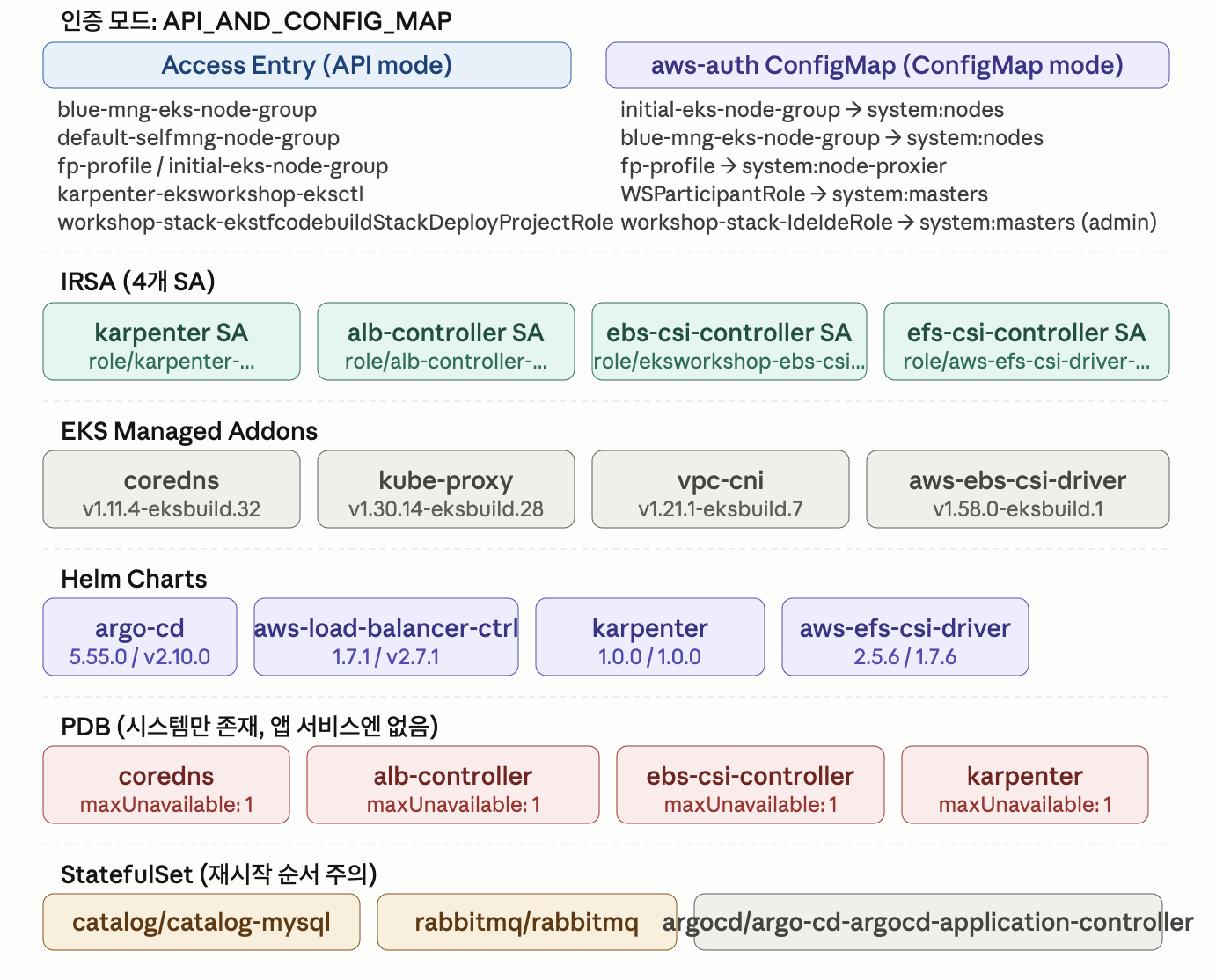
coredns의 maxUnavailable: 1은 2개의 coredns 파드 중 한 번에 1개까지만 종료 가능하다는 뜻입니다. 노드 drain 시 해당 노드에 coredns가 있으면 먼저 다른 노드에 새 coredns가 뜨고 Ready가 될 때까지 drain이 블록된다.
중요한 건 샘플 앱 서비스에는 PDB가 없다는 것입니다. catalog, carts, checkout, orders, ui
전부 PDB 없이 drain 시 즉시 eviction됩니다. 업그레이드 중 서비스 다운타임이 발생할 수 있고,
이것을 체감하기 위해 UI NLB를 미리 만들어두고 반복 호출을 걸어두는 게 의미 있을 것 같네요.
ArgoCD가 CodeCommit에 HTTPS Git으로 접근하기 위해 IAM User 기반 서비스 자격증명을 발급하고
Secrets Manager에 저장합니다. IRSA로 처리하지 않는 이유는 ArgoCD의 Git 접근이
HTTPS credential 방식이기 때문입니다 !
02. 샘플 애플리케이션 이해하기
이 워크숍의 대부분 실습에서는 실제 구성 요소를 제공하는 공통 샘플 애플리케이션을 사용합니다.
이 샘플 애플리케이션은 고객이 카탈로그를 탐색하고, 장바구니에 상품을 추가하고, 결제 과정을 통해
주문을 완료할 수 있는 간단한 웹 쇼핑몰 애플리케이션을 모델링합니다.
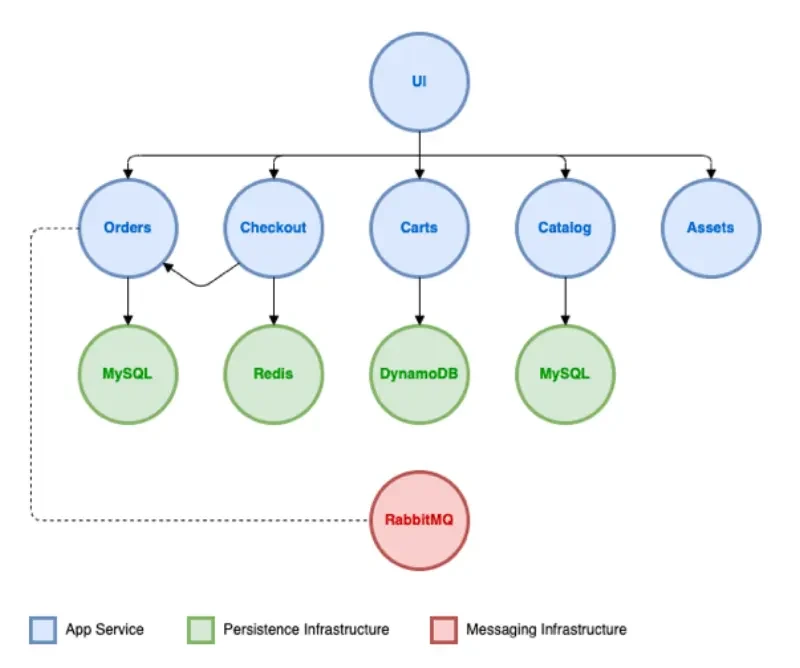
이 애플리케이션은 여러 구성 요소와 종속성을 가지고 있습니다.
서비스
역할
UI
프론트엔드. 사용자 요청을 받아 각 백엔드 서비스로 라우팅
Catalog
상품 목록 및 상세 정보 API
Carts
쇼핑 카트 상태 관리 API
Checkout
결제 프로세스 API
Orders
주문 접수 및 처리 API
Assets
상품 이미지 등 정적 자원 제공
데이터 레이어도 서비스별로 분리되어 있습니다.
Catalog, Orders → MySQL (각각 별도 인스턴스)
Checkout → Redis (세션/임시 데이터)
Carts → DynamoDB
특이한 점은 Checkout → Orders 간 통신이 동기 호출이 아니라 RabbitMQ를 통한 비동기 메시지 큐 방식
으로 처리된다는 것입니다. 결제가 완료되면 Checkout이 RabbitMQ에 메시지를 발행하고, Orders 서비스가
이를 구독해서 주문을 생성하는 구조네요.
업그레이드 실습에서 이 구조가 중요한 이유는, 노드가 드레인(drain)될 때 서비스별로 영향이 다르게 나타나기 때문입니다. 상태를 가진 MySQL, Redis, RabbitMQ Pod가 어느 노드에 스케줄링되어 있느냐에 따라 PDB(Pod Disruption Budget) 설정 필요성이 달라집니다.
배포 방식 : ArgoCD + GitOps
모든 구성요소는 ArgoCD를 통해 EKS 클러스터에 배포됩니다. GitOps 리포지토리로는 AWS CodeCommit을 사용하며, 각 서비스의 Kubernetes 매니페스트가 리포지토리에 관리된다.
실습 환경 접속 흐름은 다음과 같습니다.
# 1. CodeCommit 리포지토리 클론
cd ~/environment
git clone codecommit::${REGION}://eks-gitops-repo

# 2. ArgoCD 서버 엔드포인트 확인 및 로그인
export ARGOCD_SERVER=$(kubectl get svc argo-cd-argocd-server -n argocd \
  -o json | jq --raw-output '.status.loadBalancer.ingress[0].hostname')

export ARGOCD_USER="admin"
export ARGOCD_PWD=$(kubectl -n argocd get secret argocd-initial-admin-secret \
  -o jsonpath="{.data.password}" | base64 -d)

argocd login ${ARGOCD_SERVER} \
  --username ${ARGOCD_USER} \
  --password ${ARGOCD_PWD} \
  --insecure --skip-test-tls --grpc-web

# 3. 전체 Pod 상태 확인
kubectl get pods -A
ArgoCD UI에 접속하면 각 마이크로서비스에 대응하는 Application이 생성되어 있고,
대부분이 Healthy & Synced 상태인 것을 확인할 수 있습니다.
단, ui Application은 OutOfSync 상태로 시작하는데, 이후 실습에서 의도적으로
변경 사항을 적용하면서 업그레이드 검증에 활용됩니다.
ArgoCD 현 상태를 CLI로도 아래와 같이 확인하실 수 있습니다.
#
argocd login ${ARGOCD_SERVER} --username ${ARGOCD_USER} --password ${ARGOCD_PWD} --insecure --skip-test-tls --grpc-web
'admin:login' logged in successfully
Context 'k8s-argocd-argocdar-eb7166e616-ed2069d8c15177c9.elb.us-west-2.amazonaws.com' updated

#
argocd repo list
TYPE  NAME  REPO                                                                     INSECURE  OCI    LFS    CREDS  STATUS      MESSAGE  PROJECT
git         https://git-codecommit.us-west-2.amazonaws.com/v1/repos/eks-gitops-repo  false     false  false  true   Successful

#
argocd app list
NAME              CLUSTER                         NAMESPACE  PROJECT  STATUS  HEALTH   SYNCPOLICY  CONDITIONS  REPO                                                                     PATH            TARGET
argocd/apps       https://kubernetes.default.svc             default  Synced  Healthy  Auto        <none>      https://git-codecommit.us-west-2.amazonaws.com/v1/repos/eks-gitops-repo  app-of-apps
argocd/assets     https://kubernetes.default.svc             default  Synced  Healthy  Auto-Prune  <none>      https://git-codecommit.us-west-2.amazonaws.com/v1/repos/eks-gitops-repo  apps/assets     main
argocd/carts      https://kubernetes.default.svc             default  Synced  Healthy  Auto-Prune  <none>      https://git-codecommit.us-west-2.amazonaws.com/v1/repos/eks-gitops-repo  apps/carts      main
argocd/catalog    https://kubernetes.default.svc             default  Synced  Healthy  Auto-Prune  <none>      https://git-codecommit.us-west-2.amazonaws.com/v1/repos/eks-gitops-repo  apps/catalog    main
argocd/checkout   https://kubernetes.default.svc             default  Synced  Healthy  Auto-Prune  <none>      https://git-codecommit.us-west-2.amazonaws.com/v1/repos/eks-gitops-repo  apps/checkout   main
argocd/karpenter  https://kubernetes.default.svc             default  Synced  Healthy  Auto-Prune  <none>      https://git-codecommit.us-west-2.amazonaws.com/v1/repos/eks-gitops-repo  apps/karpenter  main
argocd/orders     https://kubernetes.default.svc             default  Synced  Healthy  Auto-Prune  <none>      https://git-codecommit.us-west-2.amazonaws.com/v1/repos/eks-gitops-repo  apps/orders     main
argocd/other      https://kubernetes.default.svc             default  Synced  Healthy  Auto-Prune  <none>      https://git-codecommit.us-west-2.amazonaws.com/v1/repos/eks-gitops-repo  apps/other      main
argocd/rabbitmq   https://kubernetes.default.svc             default  Synced  Healthy  Auto-Prune  <none>      https://git-codecommit.us-west-2.amazonaws.com/v1/repos/eks-gitops-repo  apps/rabbitmq   main
argocd/ui         https://kubernetes.default.svc             default  Synced  Healthy  Auto-Prune  <none>      https://git-codecommit.us-west-2.amazonaws.com/v1/repos/eks-gitops-repo  apps/ui         main

argocd app get apps
Name:               argocd/apps
Project:            default
Server:             https://kubernetes.default.svc
Namespace:
URL:                https://k8s-argocd-argocdar-eb7166e616-ed2069d8c15177c9.elb.us-west-2.amazonaws.com/applications/apps
Source:
- Repo:             https://git-codecommit.us-west-2.amazonaws.com/v1/repos/eks-gitops-repo
  Target:
  Path:             app-of-apps
SyncWindow:         Sync Allowed
Sync Policy:        Automated
Sync Status:        Synced to  (acc257a)
Health Status:      Healthy

GROUP        KIND         NAMESPACE  NAME       STATUS  HEALTH  HOOK  MESSAGE
argoproj.io  Application  argocd     karpenter  Synced                application.argoproj.io/karpenter created
argoproj.io  Application  argocd     carts      Synced                application.argoproj.io/carts created
argoproj.io  Application  argocd     assets     Synced                application.argoproj.io/assets created
argoproj.io  Application  argocd     catalog    Synced                application.argoproj.io/catalog created
argoproj.io  Application  argocd     checkout   Synced                application.argoproj.io/checkout created
argoproj.io  Application  argocd     rabbitmq   Synced                application.argoproj.io/rabbitmq created
argoproj.io  Application  argocd     other      Synced                application.argoproj.io/other created
argoproj.io  Application  argocd     ui         Synced                application.argoproj.io/ui created
argoproj.io  Application  argocd     orders     Synced                application.argoproj.io/orders created

argocd app get carts
Name:               argocd/carts
Project:            default
Server:             https://kubernetes.default.svc
Namespace:
URL:                https://k8s-argocd-argocdar-eb7166e616-ed2069d8c15177c9.elb.us-west-2.amazonaws.com/applications/carts
Source:
- Repo:             https://git-codecommit.us-west-2.amazonaws.com/v1/repos/eks-gitops-repo
  Target:           main
  Path:             apps/carts
SyncWindow:         Sync Allowed
Sync Policy:        Automated (Prune)
Sync Status:        Synced to main (acc257a)
Health Status:      Healthy

GROUP  KIND            NAMESPACE  NAME            STATUS  HEALTH   HOOK  MESSAGE
       Namespace                  carts           Synced                 namespace/carts created
       ServiceAccount  carts      carts           Synced                 serviceaccount/carts created
       ConfigMap       carts      carts           Synced                 configmap/carts created
       Service         carts      carts-dynamodb  Synced  Healthy        service/carts-dynamodb created
       Service         carts      carts           Synced  Healthy        service/carts created
apps   Deployment      carts      carts           Synced  Healthy        deployment.apps/carts created
apps   Deployment      carts      carts-dynamodb  Synced  Healthy        deployment.apps/carts-dynamodb created

#
argocd app get carts -o yaml
...
spec:
  destination:
    server: https://kubernetes.default.svc
  ignoreDifferences:
  - group: apps
    jsonPointers:
    - /spec/replicas
    - /metadata/annotations/deployment.kubernetes.io/revision
    kind: Deployment
  - group: autoscaling
    jsonPointers:
    - /status
    kind: HorizontalPodAutoscaler
  project: default
  source:
    path: apps/carts
    repoURL: https://git-codecommit.us-west-2.amazonaws.com/v1/repos/eks-gitops-repo
    targetRevision: main
  syncPolicy:
    automated:
      prune: true
      selfHeal: true
    syncOptions:
    - RespectIgnoreDifferences=true
...

argocd app get ui -o yaml
...
spec:
  destination:
    server: https://kubernetes.default.svc
  ignoreDifferences:
  - group: apps
    jsonPointers:
    - /spec/replicas
    - /metadata/annotations/deployment.kubernetes.io/revision
    kind: Deployment
  - group: autoscaling
    jsonPointers:
    - /status
    kind: HorizontalPodAutoscaler
  project: default
  source:
    path: apps/ui
    repoURL: https://git-codecommit.us-west-2.amazonaws.com/v1/repos/eks-gitops-repo
    targetRevision: main
  syncPolicy:
    automated:
      prune: true
      selfHeal: true
    syncOptions:
    - RespectIgnoreDifferences=true
...
ArgoCD ignoreDifferences
argocd app get carts -o yaml을 보면 모든 앱에 공통으로 아래 설정이 들어가 있습니다.
syncPolicy.automated.selfHeal: true가 켜져 있으면, ArgoCD는 클러스터 상태가 Git 리포의
상태와 다를 때 자동으로 Git 상태를 되돌립니다.
문제는 HPA가 부하에 따라 Deployment.spec.replicas를 동적으로 조정하는데, 이 값이 Git에 선언된 값
(replicas: 1)과 달라지는 순간 ArgoCD가 OutOfSync로 판단하고 replicas를 다시 1로 강제 복원합니다.
HPA가 스케일 아웃해도 ArgoCD가 계속 되돌리는 무한 충돌이 발생하죠.
결론은, ignoreDifferences는 ArgoCD가 동기화 상태를 판단할 때 특정 필드를 무시하도록 설정합니다.
/spec/replicas를 ignore 목록에 넣으면 HPA가 replicas를 바꿔도 ArgoCD는 Synced로 유지하고 건드리지 않습니다. syncOptions: [RespectIgnoreDifferences=true]도 함께 설정되어 있어서, Sync 실행 시에도 이 필드를 덮어쓰지 않습니다.
업그레이드 실습에서 이 설정이 중요한 이유는, 노드 drain 후 파드가 재배치되는 과정에서
HPA가 replicas를 조정할 수 있는데, 이때 ArgoCD가 간섭하지 않아야 복구가 정상적으로 진행되기 때문.