[SAST 자동화] Part 2. 보안 스캔 CI 파이프라인 구축기

안녕하세요,
Github Actions와 Checkmarx one 도구를 활용한 CI 구축에 대해
정리하려고 합니다.
01. 프로젝트 개요
✅ 배경
PHP 7.2 버전의 Symfony 기반 레거시 시스템에 대한 보안 스캔 자동화를 구축해보려 합니다.
기존에는 수동으로 Checkmarx 스캔을 실행하고 결과를 확인했지만, 이를 GitHub Actions를 통해
자동화하여 모든 PR에서 자동으로 보안 취약점을 검사하도록 개선했습니다.
하지만, 컴플라이언스 준수에 의거하여 "Merge 이전에 승인권자의 승인" 작업은 수동으로 진행하였습니다.
✅ 목표
- PR (Pull Request) 생성 시 자동으로 Checkmarx 보안 스캔 실행
- SAST (Static Application Security Testing) 및 SCA (Software Composition Analysis) 수행
- PR 코멘트로 스캔 결과 자동 리포팅
- DEV/STG 환경에서는 Non-blocking, Production에서는 Blocking 정책 적용
- 회사 내규에 따른 보안 정책 준수 및 템플릿 스타일 유지
✅ 프로젝트 구조
메인 Branch
├── .github/
│ └── workflows/
│ ├── checkmarx-security-scan.yml # workflows 참조 방식
│ └── checkmarx-security-selfscan.yml # API 직접 호출 방식
├── scan-service/
│ └── docs/
│ └── SECURITY.template.md # 보안 리포트 템플릿
├── src/
├── bin/
└── 등등 여러 소스 코드 ..
- 위 Tree 구조를 확인하였을 때 2가지의 방식에 의한 CI 파이프라인을 구성하였음을 알 수 있습니다.
02. 기술 스택 및 환경
✅ 개발 환경
- 소스 관리 : Github Enterprise
- CI : GitHub Actions
- 보안 스캔 : Checkmarx One (EU Region)
- 언어/프레임워크 : PHP 7.2 (Symfony), Java 11 (Pre-built WAR files)
- 인증 : Keycloak
✅ 사용한 GitHub Actions 버전
코드 체크아웃 : actions/checkout@v4
의존성 캐싱 : actions/cache@v4
아티팩트 업로드 : actions/upload-artifact@v4
PR 코멘트 생성 : actions/github-script@v7
PHP 환경 설정 : shivammathur/setup-php@v2
03. 두 가지 구현 방식 비교
프로젝트를 진행하면서 두 가지 방식을 모두 구현하고 각각의 장단점을 파악했습니다.
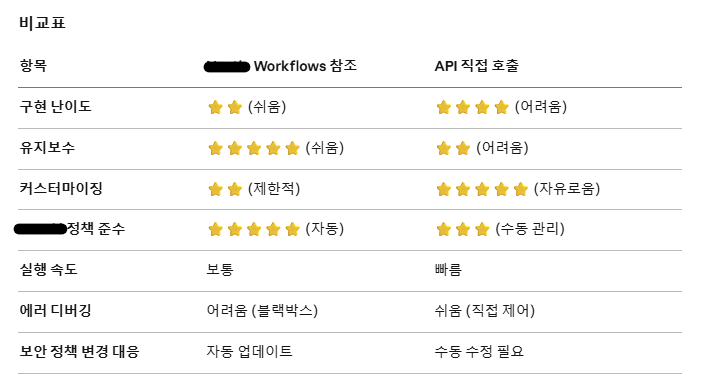
✅ Workflows 참조 방식
- Production 환경에서 사용
- 회사 내규 보안 정책 엄격히 준수 필요함 (중앙 집중식)
- 표준화된 프로세스 선호
- 유지보수 리소스 최소화
✅ API 직접 호출 방식
- DEV/STG 환경에서 사용
- 커스텀 로직이 필요함.
- Non-Blocking 스캔 필요 (빠른 개발 및 배포 용이)
- 세밀한 제어 및 디버깅 필요.
방식1. Workflows 참조 방식
📌 개요
- IT 팀에서 제공하는 재사용 가능한 워크플로우를 참조하는 방식입니다.
- 조직 차원에서 관리되는 표준화된 보안 스캔 프로세스를 사용합니다.
CI 파이프라인을 배포하기 위한 yaml 파일 구조이며, 일부만 공개하였음을 알립니다.
워크플로우 구조 (yaml파일)
name: PROD CI Pipeline

on:
  pull_request:
    branches: [Production]
  workflow_dispatch:

jobs:
  code-quality:
    name: Code Quality Check
    runs-on: ubuntu-latest
    steps:
      - uses: actions/checkout@v4
      - name: Setup PHP
        uses: shivammathur/setup-php@v2
        with:
          php-version: '7.2'
      - name: PHP CodeSniffer
        run: phpcs --standard=PSR2 .

  php-build-test:
    name: PHP Build & Test
    runs-on: ubuntu-latest
    steps:
      - uses: actions/checkout@v4
      - name: Check PHP project
        run: |
          if [ -f composer.json ]; then
            composer install --no-interaction
          fi

  security-scan:
    name: SAST Security Scan
    needs: [php-build-test]
    uses: it-team/CheckmarxOne-Scan/.github/workflows/reusable-checkmarx-scan.yml@main
    secrets: inherit
    permissions:
      contents: read
      pull-requests: write
      issues: write
      security-events: write

  security-report:
    name: Security Report & PR Comment
    needs: [security-scan]
    runs-on: ubuntu-latest
    if: always()
    permissions:
      pull-requests: write
    steps:
      - uses: actions/checkout@v4
      - name: Generate Report from Template
        run: |
          # IT team 워크플로우가 생성한 결과를 활용
          echo "Security report generated by IT workflow"

  ci-summary:
    name: CI Summary
    needs: [code-quality, php-build-test, security-scan]
    runs-on: ubuntu-latest
    if: always()
    steps:
      - name: Check Results
        run: |
          if [ "${{ needs.security-scan.result }}" == "failure" ]; then
            echo "❌ Security scan failed - blocking merge"
            exit 1
          fi
✅ 핵심 설정
1) Secret 설정 : 자동으로 조직 및 저장소의 secrets 상속
secrets: inherit # 자동으로 조직 및 저장소의 secrets 상속필요한 secrets
- CX_API_KEY: Checkmarx refresh token
- GIT_PAT_TOKEN: GitHub Personal Access Token
2) Variables 설정
vars.CX_PROJECT_ID: "726e9512-3d6e-4790-8c1a-c4feeccb2c2d"
3) Permissions 설정
permissions:
  contents: read              # 코드 읽기
  pull-requests: write        # PR 코멘트 작성
  issues: write               # Issue 코멘트 작성
  security-events: write      # 보안 이벤트 기록
✅ 템플릿 파일 설정
IT team 워크플로우는 scan-service/docs/SECURITY.template.md 파일을 사용
# Security Scan Report

## Checkmarx Scan Summary
### SAST Results
* CRITICAL: {{CRITICAL}} findings
* HIGH: {{HIGH}} findings
* MEDIUM: {{MEDIUM}} findings
* LOW: {{LOW}} findings
### SCA Results
* CRITICAL: {{SCA_CRITICAL}} findings
* HIGH: {{SCA_HIGH}} findings
* MEDIUM: {{SCA_MEDIUM}} findings
* LOW: {{SCA_LOW}} findings
## Security Index
{{INDEX}} Presence of Critical or High severity SAST issues will result in a Red Security Index for this application according to [Nestlé Security Policies](https://nestle.sharepoint.com/sites/security).
## View Full Results
🔍 [Click here to open this Checkmarx scan results]({{SCAN_URL}})
## Remediation Guide
🔧 For details on how to remediate or challenge the results click [here]({{REMEDIATION_URL}})
---
*Last updated: {{LAST_UPDATED}}*
*This scan is executed via Github Actions as part of our CI/CD process.*
📌 장점
- IT team 표준 준수 : 조직 정책이 자동으로 적용된다.
- 자동 업데이트 : IT team이 워크플로우를 업데이트하면 자동으로 반영됨.
- 간단한 구성 : 복잡한 API 호출 로직 불필요
- 검증된 프로세스 : 다른 지사의 IT team이 사용중.
📌 단점
- 제한적 커스터마이징: 내부 로직 수정 불가
- 디버깅 어려움: 블랙박스 방식으로 작동
- 의존성: IT team 저장소에 대한 접근 권한 필요
- 유연성 부족: Non-blocking 스캔 같은 커스텀 정책 적용 어려움
방식 2. Checkmarx API 직접 호출 방식
📌 개요
- Checkmarx REST API를 직접 호출하여 스캔을 트리거하고 결과를 가져오는 방식입니다.
- 완전한 제어가 가능하며 커스텀 로직 구현이 자유롭습니다.
워크플로우 구조 (yaml파일)
name: DEV/STG CI Pipeline
on:
pull_request:
branches: [Dev/SHT, STG/SHT]
types: [opened, synchronize, reopened]
workflow_dispatch:
concurrency:
group: checkmarx-${{ github.event.pull_request.number || github.ref }}
cancel-in-progress: true
jobs:
build:
name: Build and Test
runs-on: ubuntu-latest
steps:
- uses: actions/checkout@v4
with:
fetch-depth: 0
- name: Setup PHP 7.2
if: hashFiles('composer.json') != ''
uses: shivammathur/setup-php@v2
with:
php-version: '7.2'
extensions: mbstring, xml, ctype, iconv, intl, pdo_mysql
tools: composer:v2
- name: Install Dependencies
if: hashFiles('composer.json') != ''
run: composer install --no-interaction --optimize-autoloader
continue-on-error: true
scan:
name: Checkmarx Scan
needs: build
runs-on: ubuntu-latest
if: always()
outputs:
scan_id: ${{ steps.trigger.outputs.scan_id }}
steps:
- uses: actions/checkout@v4
- name: Authenticate and Trigger Scan
id: trigger
continue-on-error: true
run: |
echo "🔐 Authenticating with Checkmarx..."
# Step 1: 인증 토큰 획득
TOKEN=$(curl -s -X POST "https://eu.iam.checkmarx.net/auth/realms/nestleglobal/protocol/openid-connect/token" \
-H "Content-Type: application/x-www-form-urlencoded" \
--data "grant_type=refresh_token" \
--data "client_id=ast-app" \
--data "refresh_token=${{ secrets.CX_API_KEY }}" | jq -r '.access_token')
if [[ -z "$TOKEN" || "$TOKEN" == "null" ]]; then
echo "❌ Failed to authenticate"
echo "scan_id=none" >> $GITHUB_OUTPUT
exit 0
fi
echo "✅ Authentication successful"
# Step 2: 브랜치 이름 결정 (PR의 실제 소스 브랜치 사용)
REPO_URL="https://github.com/${{ github.repository }}"
if [ "${{ github.event_name }}" == "pull_request" ]; then
BRANCH="${{ github.head_ref }}" # PR의 실제 소스 브랜치
else
BRANCH="${{ github.ref_name }}"
fi
echo "🚀 Triggering Checkmarx scan..."
echo " Repository: $REPO_URL"
echo " Branch: $BRANCH"
# Step 3: 스캔 트리거
RESPONSE=$(curl -s -X POST "https://eu.ast.checkmarx.net/api/scans/" \
-H "Authorization: Bearer $TOKEN" \
-H "Content-Type: application/json" \
-d '{
"project": {
"id": "'"${{ vars.CX_PROJECT_ID }}"'"
},
"type": "git",
"handler": {
"repoUrl": "'"$REPO_URL"'",
"branch": "'"$BRANCH"'",
"credentials": {
"username": "",
"type": "apiKey",
"value": "'"${{ secrets.GIT_PAT_TOKEN }}"'"
}
},
"tags": {
"GithubAction_Scan": "true",
"Environment": "Dev-STG"
},
"config": [
{
"type": "sast",
"value": {
"incremental": "false",
"presetName": "ASA Premium",
"engineVerbose": "false"
}
},
{
"type": "sca",
"value": {
"lastSastScanTime": "",
"exploitablePath": "true"
}
}
]
}')
SCAN_ID=$(echo "$RESPONSE" | jq -r '.id // empty')
if [[ -z "$SCAN_ID" ]]; then
echo "❌ Failed to retrieve scan ID"
echo "Response: $RESPONSE"
echo "scan_id=none" >> $GITHUB_OUTPUT
exit 0
fi
echo "✅ Scan triggered successfully"
echo " Scan ID: $SCAN_ID"
echo "scan_id=$SCAN_ID" >> $GITHUB_OUTPUT
- name: Wait for Scan Completion
if: steps.trigger.outputs.scan_id != 'none'
continue-on-error: true
run: |
echo "⏳ Waiting for scan to complete..."
TOKEN=$(curl -s -X POST "https://eu.iam.checkmarx.net/auth/realms/nestleglobal/protocol/openid-connect/token" \
-H "Content-Type: application/x-www-form-urlencoded" \
--data "grant_type=refresh_token" \
--data "client_id=ast-app" \
--data "refresh_token=${{ secrets.CX_API_KEY }}" | jq -r '.access_token')
SCAN_ID="${{ steps.trigger.outputs.scan_id }}"
# 최대 30분 대기
for i in {1..90}; do
STATUS=$(curl -s -X GET "https://eu.ast.checkmarx.net/api/scans/$SCAN_ID" \
-H "Authorization: Bearer $TOKEN" | jq -r '.status')
echo "[$i/90] Scan status: $STATUS"
if [[ "$STATUS" == "Completed" ]]; then
echo "✅ Scan completed"
break
elif [[ "$STATUS" == "Failed" ]]; then
echo "❌ Scan failed"
break
elif [[ "$STATUS" == "Canceled" ]]; then
echo "⚠️ Scan canceled"
break
fi
sleep 20
done
results:
name: Process Results
needs: [build, scan]
runs-on: ubuntu-latest
if: always()
permissions:
contents: write
pull-requests: write
steps:
- uses: actions/checkout@v4
- name: Get Scan Results from API
id: results
continue-on-error: true
run: |
echo "🔍 Fetching scan results..."
# 인증
TOKEN=$(curl -s -X POST "https://eu.iam.checkmarx.net/auth/realms/itglobal/protocol/openid-connect/token" \
-H "Content-Type: application/x-www-form-urlencoded" \
-d "grant_type=refresh_token" \
-d "client_id=ast-app" \
-d "refresh_token=${{ secrets.CX_API_KEY }}" | jq -r '.access_token')
# 최근 스캔 가져오기
SCANS=$(curl -s -X GET "https://eu.ast.checkmarx.net/api/scans?project-id=${{ vars.CX_PROJECT_ID }}&limit=1&sort=-created_at" \
-H "Authorization: Bearer $TOKEN")
SCAN_ID=$(echo "$SCANS" | jq -r '.scans[0].id // empty')
SCAN_STATUS=$(echo "$SCANS" | jq -r '.scans[0].status // "Unknown"')
if [[ "$SCAN_STATUS" != "Completed" ]]; then
echo "scan_status=$SCAN_STATUS" >> $GITHUB_OUTPUT
exit 0
fi
# 스캔 요약 가져오기
SUMMARY=$(curl -s -X GET "https://eu.ast.checkmarx.net/api/scan-summary?scan-ids=$SCAN_ID" \
-H "Authorization: Bearer $TOKEN")
# SAST 결과 파싱
SAST_CRITICAL=$(echo "$SUMMARY" | jq '[.scansSummaries[0].sastCounters.severityCounters[]? | select(.severity == "CRITICAL") | .counter] | add // 0')
SAST_HIGH=$(echo "$SUMMARY" | jq '[.scansSummaries[0].sastCounters.severityCounters[]? | select(.severity == "HIGH") | .counter] | add // 0')
SAST_MEDIUM=$(echo "$SUMMARY" | jq '[.scansSummaries[0].sastCounters.severityCounters[]? | select(.severity == "MEDIUM") | .counter] | add // 0')
SAST_LOW=$(echo "$SUMMARY" | jq '[.scansSummaries[0].sastCounters.severityCounters[]? | select(.severity == "LOW") | .counter] | add // 0')
# SCA 결과 파싱
SCA_CRITICAL=$(echo "$SUMMARY" | jq '[.scansSummaries[0].scaCounters.severityCounters[]? | select(.severity == "CRITICAL") | .counter] | add // 0')
SCA_HIGH=$(echo "$SUMMARY" | jq '[.scansSummaries[0].scaCounters.severityCounters[]? | select(.severity == "HIGH") | .counter] | add // 0')
SCA_MEDIUM=$(echo "$SUMMARY" | jq '[.scansSummaries[0].scaCounters.severityCounters[]? | select(.severity == "MEDIUM") | .counter] | add // 0')
SCA_LOW=$(echo "$SUMMARY" | jq '[.scansSummaries[0].scaCounters.severityCounters[]? | select(.severity == "LOW") | .counter] | add // 0')
# GitHub Output 설정
echo "scan_id=$SCAN_ID" >> $GITHUB_OUTPUT
echo "scan_status=Completed" >> $GITHUB_OUTPUT
echo "sast_critical=$SAST_CRITICAL" >> $GITHUB_OUTPUT
echo "sast_high=$SAST_HIGH" >> $GITHUB_OUTPUT
echo "sast_medium=$SAST_MEDIUM" >> $GITHUB_OUTPUT
echo "sast_low=$SAST_LOW" >> $GITHUB_OUTPUT
echo "sca_critical=$SCA_CRITICAL" >> $GITHUB_OUTPUT
echo "sca_high=$SCA_HIGH" >> $GITHUB_OUTPUT
echo "sca_medium=$SCA_MEDIUM" >> $GITHUB_OUTPUT
echo "sca_low=$SCA_LOW" >> $GITHUB_OUTPUT
- name: Comment on PR
if: github.event_name == 'pull_request'
uses: actions/github-script@v7
with:
script: |
const scanId = '${{ steps.results.outputs.scan_id }}';
const scanStatus = '${{ steps.results.outputs.scan_status }}';
const projectId = '${{ vars.CX_PROJECT_ID }}';
// 스캔 실패 처리
if (scanStatus === 'Failed' || scanStatus === 'Canceled') {
const comment = `## ❌ Checkmarx Scan ${scanStatus}
The security scan did not complete successfully.
[View Scan Details](https://eu.ast.checkmarx.net/projects/${projectId}/scans/${scanId})`;
// 코멘트 달기 로직...
return;
}
// 스캔 진행 중 처리
if (scanStatus !== 'Completed') {
const comment = `## ⏳ Checkmarx Scan In Progress
**Status:** ${scanStatus}`;
// 코멘트 달기 로직...
return;
}
// 결과 파싱
const sastCritical = parseInt('${{ steps.results.outputs.sast_critical }}') || 0;
const sastHigh = parseInt('${{ steps.results.outputs.sast_high }}') || 0;
const sastMedium = parseInt('${{ steps.results.outputs.sast_medium }}') || 0;
const sastLow = parseInt('${{ steps.results.outputs.sast_low }}') || 0;
const scaCritical = parseInt('${{ steps.results.outputs.sca_critical }}') || 0;
const scaHigh = parseInt('${{ steps.results.outputs.sca_high }}') || 0;
const scaMedium = parseInt('${{ steps.results.outputs.sca_medium }}') || 0;
const scaLow = parseInt('${{ steps.results.outputs.sca_low }}') || 0;
// Security Index 계산
const hasCriticalIssues = sastCritical > 0 || sastHigh > 0;
const securityIndex = hasCriticalIssues ? '🔴 RED' : '🟢 GREEN';
// Nestle 템플릿 스타일 코멘트 생성
const comment = "# Security Scan Report\n\n" +
"\n\n" +
"## Checkmarx Scan Summary\n\n" +
"### SAST Results\n\n" +
"* CRITICAL: " + sastCritical + " findings\n" +
"* HIGH: " + sastHigh + " findings\n" +
"* MEDIUM: " + sastMedium + " findings\n" +
"* LOW: " + sastLow + " findings\n\n" +
"### SCA Results\n\n" +
"* CRITICAL: " + scaCritical + " findings\n" +
"* HIGH: " + scaHigh + " findings\n" +
"* MEDIUM: " + scaMedium + " findings\n" +
"* LOW: " + scaLow + " findings\n\n" +
"## Security Index\n\n" +
securityIndex + " Presence of Critical or High severity SAST issues.\n\n" +
"> ⚠️ **Note**: Dev/STG environment - Issues do not fail the pipeline.\n\n" +
"## View Full Results\n\n" +
"🔍 [Checkmarx scan results](https://eu.ast.checkmarx.net/projects/" + projectId + "/scans/" + scanId + ")\n\n" +
"---\n\n" +
"*Environment*: Dev/STG (Direct API) - Non-blocking";
// 기존 bot 코멘트 찾기
const comments = await github.rest.issues.listComments({
issue_number: context.issue.number,
owner: context.repo.owner,
repo: context.repo.repo,
});
const botComment = comments.data.find(comment =>
comment.user.type === 'Bot' &&
comment.body.includes('Security Scan Report')
);
// 코멘트 업데이트 or 생성
if (botComment) {
await github.rest.issues.updateComment({
comment_id: botComment.id,
owner: context.repo.owner,
repo: context.repo.repo,
body: comment
});
} else {
await github.rest.issues.createComment({
issue_number: context.issue.number,
owner: context.repo.owner,
repo: context.repo.repo,
body: comment
});
}
final-status:
name: Final Status
needs: [build, scan, results]
runs-on: ubuntu-latest
if: always()
steps:
- name: Workflow Success
run: |
echo "✅ Workflow completed"
echo "ℹ️ Dev/STG environment - Non-blocking"
exit 0
✅ 핵심 구현 사항
1) 인증 (OAuth 2.0 Refresh Token)
TOKEN=$(curl -s -X POST "https://eu.iam.checkmarx.net/auth/realms/itglobal/protocol/openid-connect/token" \
  -H "Content-Type: application/x-www-form-urlencoded" \
  --data "grant_type=refresh_token" \
  --data "client_id=ast-app" \
  --data "refresh_token=${{ secrets.CX_API_KEY }}" | jq -r '.access_token')
2. 브랜치 이름 처리 (중요!)
# PR의 경우 head_ref 사용 (실제 소스 브랜치)

if [ "${{ github.event_name }}" == "pull_request" ]; then
  BRANCH="${{ github.head_ref }}"  # 예: Dev/SHT
else
  BRANCH="${{ github.ref_name }}"
fi
왜 중요한가?
- github.ref_name을 사용하면 Checkmarx 데쉬보드에 23/merge 같은 임시 merge 브랜치가 된다.
- Checkmarx가 이 임시 브랜치에 접근할 수 없어서 스캔 실패
- github.head_ref를 사용하면 실제 소스 브랜치(Dev/SHT) 사용
3. 스캔 설정
{
  "config": [
    {
      "type": "sast",
      "value": {
        "incremental": "false",
        "presetName": "ASA Premium",
        "engineVerbose": "false"
      }
    },
    {
      "type": "sca",
      "value": {
        "exploitablePath": "true"
      }
    }
  ]
}
4. 결과 파싱 (jq 활용)
# SAST Critical 카운트

SAST_CRITICAL=$(echo "$SUMMARY" | jq '[.scansSummaries[0].sastCounters.severityCounters[]? | select(.severity == "CRITICAL") | .counter] | add // 0')
📌 장점
- 완전한 제어: 모든 단계를 커스터마이징 가능
- 디버깅 용이: 각 단계의 로그 확인 가능
- 유연성: Non-blocking 등 커스텀 정책 구현 가능
- 독립성: IT team 워크플로우 의존성 없음
📌 단점
- 구현 복잡도: API 호출, 파싱 등 직접 구현
- 유지보수: 정책 변경 시 수동 업데이트 필요
- 보안: Secret 관리에 더 주의 필요
- 표준화: 조직 표준과 차이 발생 가능
04. 환경별 전략 및 운영 방안
1) 환경별 워크플로우 분리
Dev/STG 환경 (Non-blocking)
├── API 직접 호출 방식
├── 취약점 발견해도 파이프라인 성공
└── PR 코멘트로 리포팅만 수행
Production 환경 (Blocking)
├── IT Team Workflows 참조 방식
├── Critical/High 취약점 발견 시 파이프라인 실패
└── Merge 차단
2) 실제 구성
✅ DEV / STG 환경 워크플로우
name: DEV/STG CI Pipeline

on:
  pull_request:
    branches: [Dev/SHT, STG/SHT]  # Dev/STG 브랜치만

# ... (API 직접 호출 방식)

final-status:
  steps:
    - run: exit 0  # 항상 성공
✅ PROD 환경 워크플로우
name: PROD CI Pipeline

on:
  pull_request:
    branches: [Production]

# ... (IT team Workflows 참조 방식)

ci-summary:
  steps:
    - name: Fail on Security Issues
      run: |
        if [ "${{ needs.security-scan.result }}" == "failure" ]; then
          exit 1  # 실패 시 파이프라인 차단
        fi
3) Branch 전략
feature/* → Dev/SHT → STG/SHT → Production
↓ ↓ ↓ ↓
Local API Direct API Direct IT team Workflows
(Report) (Report) (Block)
4) PR 코멘트 템플릿 차이
✅ DEV / STG :
# Security Scan Report

🟢 GREEN

> ⚠️ Note: Dev/STG environment - Issues do not fail the pipeline
> but should be reviewed. Fixes mandatory before Production.
✅ PROD :
# Security Scan Report

🔴 RED - Blocking Merge

> ❌ Critical or High severity issues found.
> Merge is blocked until issues are resolved.
05. 결론 및 배운점
1) 프로젝트 성과
- 자동화 달성: PR 생성 시 자동 보안 스캔
- 환경별 정책: Dev/STG는 Non-blocking, Production은 Blocking
- IT Team 표준 준수: 템플릿 스타일 및 정책 적용
- 가시성 향상: PR 코멘트로 즉각적인 피드백
- 유연성 확보: 두 가지 방식 모두 구현하여 상황별 선택 가능
2) 기술적 학습
- GitHub Actions
- Reusable Workflows 활용법
- Secrets 및 Variables 관리
- Permissions 설정의 중요성
- Concurrency 제어로 중복 실행 방지
- Checkmarx API
- OAuth 2.0 인증 흐름
- REST API 구조 이해
- 스캔 트리거 및 상태 폴링
- 결과 파싱 및 분석
- jq를 활용한 JSON 처리
- Git & GitHub
- Pull Request의 merge 브랜치 메커니즘
- Git Bash 환경에서의 작업
3) 향후 개선 방안
- 알림 통합
- Slack / MS Teams 알림 추가
- 이메일 리포트 자동 발송
- 메트릭 수집
- 스캔 시간 추적
- 취약점 추세 분석
- 데쉬보드 구축
- 자동 수정
- 특정 유형의 취약점 자동 수정 PR 생성
- Dependabot 통합
- 정책 고도화
- 취약점 유형별 차등 처리
- False positive 관리
- 예외처리 워크플로우
- 성능 최적화
- Incremental scan 활용
- 캐싱 전략 개선
- 병렬 처리 도입
마무리
이번 프로젝트를 통해 보안 스캔 자동화라는 단순한 목표를 넘어, CI 파이프라인 설계, 조직 정책 준수, 그리고 유연성 확보 사이의 균형을 맞추는 방법을 배웠습니다.
특히 두 가지 방식을 모두 구현해봄으로써 각각의 장단점을 명확히 이해할 수 있었고, 상황에 맞는 최적의 선택을 할 수 있는 기준을 마련했습니다.
앞으로 이 경험을 바탕으로 CD 파이프라인 까지 설계하여 완전한 CI/CD 파이프라인 구축을 해볼 예정입니다.
감사합니다 :)